 WowAddons
Threat Bar
от mat · 1 установка
Ничего не открылось? Нужен WowAddons, бесплатно: он ставит Threat Bar в игру в один клик и сам обновляет.
- Скачать для Windows и открой его.
- Установить Threat Bar: WowAddons добавит его в игру.
WowAddons работает на компьютере: открой эту страницу там.
Вручную, без WowAddons: .zip, распакуй в World of Warcraft/_forever_/Interface/AddOns.
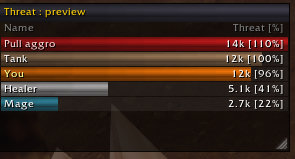
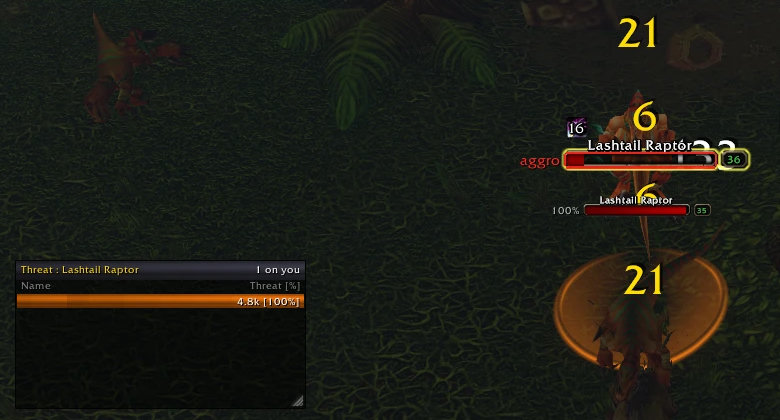
Threat on enemies: your threat in % above each enemy's nameplate with a border in its colour, a sound before you pull aggro, a tank mode (stance, form, Righteous Fury) that shows the mobs not on you and warns when one gets away, and a threat window with your target's threat list (you, your group and
Threat meter for WoW Forever: see your threat on every enemy, the whole group's threat list on your target, and a warning before you pull aggro.
What it does
- Threat list on your target, in a window of its own: you, your group and the pets, sorted by threat, with a class-coloured bar each and the threat as
12.4k [96%]. The one holding aggro sits at 100%. - Pull aggro line: a red bar in the list shows where you take aggro, 110% of the tank's threat in melee and 130% at range.
- Nameplates: your threat in % above each enemy, with a border in the game's threat colour (grey, yellow, orange, red).
- Warning before you pull: a sound and a red line on screen when your threat passes 85% (you can change it), and an "Aggro!" alert if you take it in a group.
- Tank mode, on its own in Defensive Stance, Bear Form or with Righteous Fury: mobs that are not on you get a magenta border with the name of who they are on, and "Aggro lost" tells you when one gets away.
- Counter in the title bar: how many mobs are on you, and in tank mode how many are not.
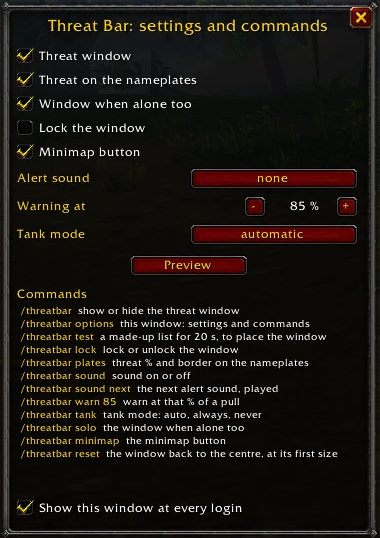
- Minimap button, six alert sounds to choose from, a preview to place the window out of combat, and a settings window with every command at login (untick it to stop it showing).
WoW Forever hides threat numbers from addons in some fights, and on the nameplates of enemies you don't target. Threat Bar still shows the % the game draws (in white), but it can't sort, colour, count or warn on a number it cannot read, and the pull aggro line is hidden then. Your target's nameplate always reads its threat.
How to use the addon
- Left click the minimap button: show or hide the threat window. Right click: settings.
- Drag the window to move it, drag its bottom-right corner for more rows.
/threatbar(or/tbar,/threat): show or hide the window/tbar options: settings and commands/tbar test: a made-up list for 20 seconds, to place the window/tbar lock: lock or unlock the window/tbar plates: threat % and border on the nameplates/tbar sound: sound on or off,/tbar sound next: the next alert sound/tbar warn 85: warn at that % of a pull/tbar tank: tank mode automatic, always or never/tbar solo: the window when alone too/tbar minimap: the minimap button/tbar reset: the window back to the centre, at its first size
Questions
The window doesn't show. It shows in a group, or alone (on by default), when your target is an enemy with threat or in combat, or when mobs are on you. Type /tbar test to see it now.
I see [96%] but no threat number. The game hides the number in that fight; the % is still the game's own.
Can I stop the settings window at login? Untick "Show this window at every login" at its bottom.
Версии
- v8 2026-11-24 · 13 KB
- v7 2026-11-24 · 13 KB
- v6 2026-11-23 · 13 KB
- v5 2026-11-23 · 13 KB
- v4 2026-11-23 · 12 KB
Комментарии
Что работает, что ломается, чего хочется дальше: автор читает всё здесь.
Войти, чтобы оставить комментарий
Комментариев пока нет.