 WowAddons
Combo Forge
by mat
Nothing opened? It takes WowAddons, free: it puts Combo Forge in your game in one click and keeps it up to date.
- Download for Windows then open it.
- Install Combo Forge: WowAddons adds it to your game.
WowAddons runs on your computer: open this page there.
By hand, without WowAddons: the .zip, to unzip into World of Warcraft/_forever_/Interface/AddOns.
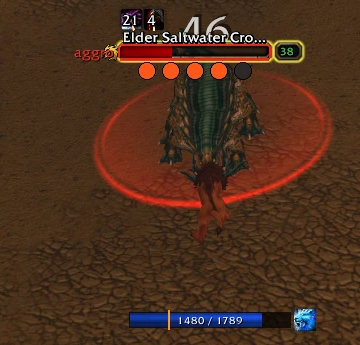
Your combo points on your target's nameplate, forged your way: 13 shapes, 7 colour sets, size, place and sound. For rogues and druids, with a druid mana bar in Bear and Cat Form. /cf
Your combo points, your way: on the enemy nameplate in the shape, colours, size and sound you choose, for rogues and druids. A druid mana bar in Bear and Cat Form comes with it. For WoW Forever.
What it does
- Combo points on your target's nameplate: up to five points under its health bar, for rogues and for druids in Cat Form. No more looking down at the target frame to know when to finish.
- Your shape and colours: squares, circles, rings, diamonds, bars, stars, skulls, moons, crosses, triangles, the classic red gems, your class's own icon (a dagger, a claw) or a plain number; yellow to red or green to red as they add up, each point its own colour, ice blue, gold, white or your class colour; any size, below the health bar or above the name, moved a few pixels left, right, up or down.
- No nameplate? When your target has none (nameplates off, or too far), the points show on a bar of their own that you place where you want.
- Full points: the points pulse when you have them all, with one of nine sounds if you want one.
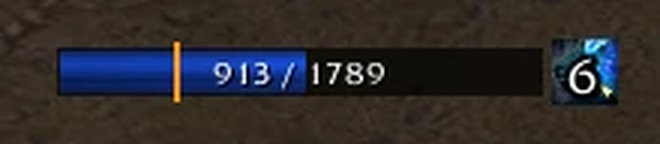
- Mana while shapeshifted (druids): in Bear, Cat and the travel forms the game shows rage or energy, not mana. Combo Forge adds a blue bar with your mana as
1730 / 2450 (71%), so you know if you can shift out to heal. It can show in caster form too. - Shifting Power and the form's cost: an orange line on the mana bar at what Shifting Power costs, a white one at what your form costs, so you see at a glance if you can still cast it, or shift out and back. Shifting Power's button sits by the bar: blue without the mana, the game's cooldown on it, in full colour when you can cast it.
- Rogues: the mana bar turns itself off, and its settings are greyed out.
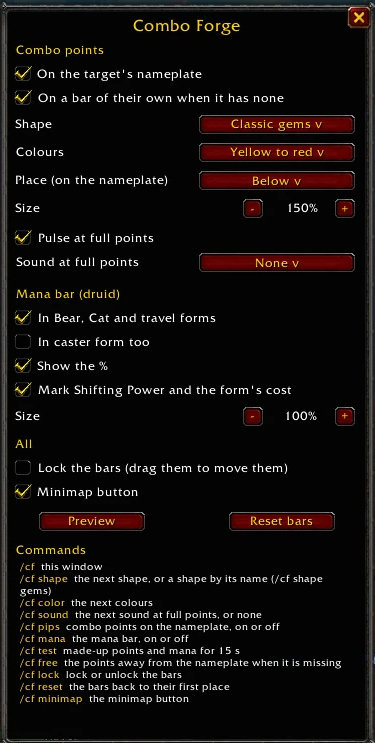
- Minimap button and a settings window with every option and command.
WoW Forever hides some numbers from addons in some fights. Combo Forge then shows the count as a number instead of points, and the mana bar keeps its text without the %.
How to use the addon
- Left click the minimap button: settings. Right click: a preview for 15 seconds.
- In the settings, left click a choice (shape, colours, place, sound) for its list, right click it to go back one.
- Drag the mana bar and the points' own bar to move them (during
/cf testfor the points). /cf(or/comboforge): the settings/cf shape: the next shape, or/cf shape circles(squares, circles, rings, diamonds, bars, stars, skulls, moons, crosses, triangles, gems, class, number)/cf color: the next colours, or/cf color steps(ramp, steps, traffic, ice, gold, white, class)/cf sound: the next sound at full points, or none/cf pips: combo points on the nameplate, on or off/cf mana: the mana bar, on or off/cf test: made-up points and mana for 15 seconds, to place the bar/cf free: the points on a bar of their own when the target has no nameplate, on or off/cf lock: lock or unlock the bars/cf reset: the bars back to their first place and size/cf minimap: the minimap button/cf help: the commands in the chat
Questions
I don't see the points. They show under your target's nameplate once you have a combo point on it. Turn enemy nameplates on with V.
The mana bar doesn't show. It shows only for a druid in a form, or in caster form too if you tick it. Type /cf test to see it now and move it.
Comments
What works, what breaks, what you would like next: the author reads it all here.
Sign in to leave a comment
No comment yet.