 WowAddons
Rival Ledger
by castella · 2 installs
Nothing opened? It takes WowAddons, free: it puts Rival Ledger in your game in one click and keeps it up to date.
- Download for Windows then open it.
- Install Rival Ledger: WowAddons adds it to your game.
WowAddons runs on your computer: open this page there.
By hand, without WowAddons: the .zip, to unzip into World of Warcraft/_forever_/Interface/AddOns.
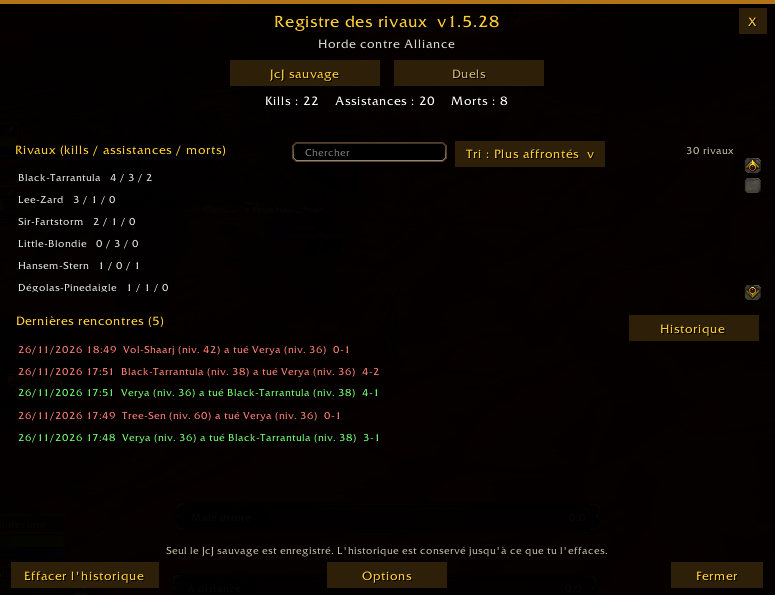
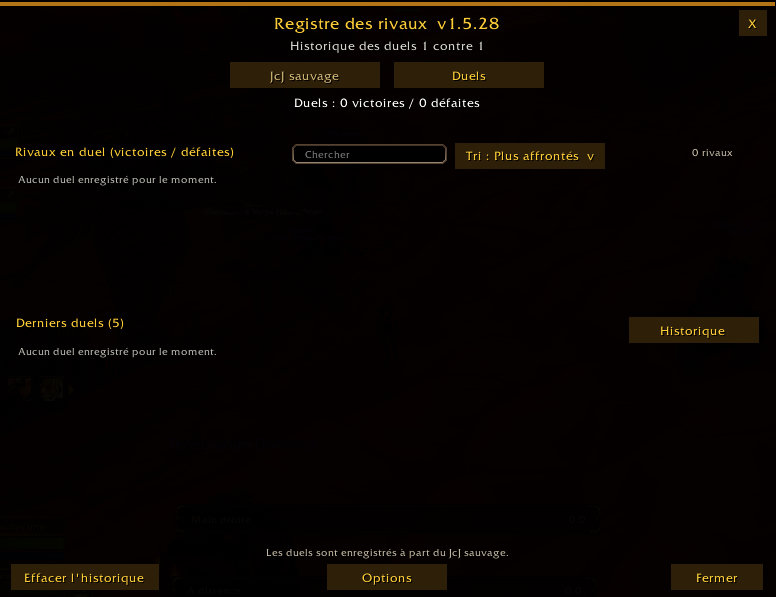
Automatically keeps a local open-world PvP history of hostile player kills, assists and deaths. Click its minimap icon to open the history.
Rival Ledger keeps a local, per-character record of open-world PvP kills, assists and deaths against hostile players in World of Warcraft Forever, with names, known levels, counts and timestamps.
Remember the players you meet and follow your ongoing rivalries. See your record against an opponent at a glance, then open the history to revisit each fight. Duels have their own separate record.
What it does
- Includes separate Open-world PvP and Duels tabs. Duels have their own victory, defeat and opponent history.
- Automatically records an enemy kill when you or your pet lands the final blow.
- Automatically records an assist after a recent engagement when another player lands the final blow. Generic honor-award messages are matched briefly to an observed enemy death even when they do not include the victim's name.
- Tracks multiple enemies at once. Closely spaced deaths remain separate, and a named honor event is matched to the correct recently engaged player when the game provides their name.
- There is no user-configurable damage threshold. If another player deals the final blow, the event counts as an assist. If a mob is identified as the finisher, the kill goes to the player who recently engaged the target, even when the damage meter omits that victim's row. If the finisher is unknown, the addon briefly waits for available signals; a game honor award after a recent engagement counts as a kill unless a player finisher is identified.
- Damage diagnostics show the measured share and applied result; they cannot change the score.
- Records a PvP death against the hostile player identified by the death recap. It retries for one minute if the recap is delayed, then tries again on release or resurrection. After a /reload while the character is still dead, it also attempts to recover that recap without counting the same death twice.
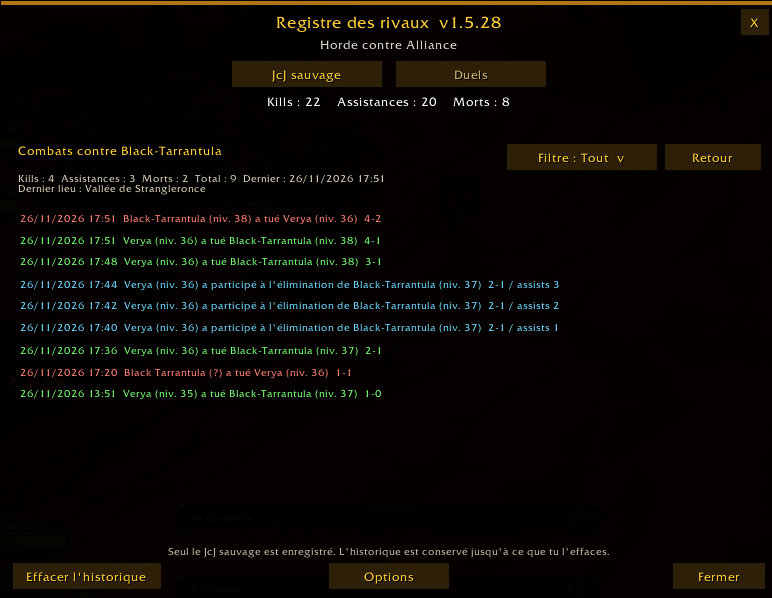
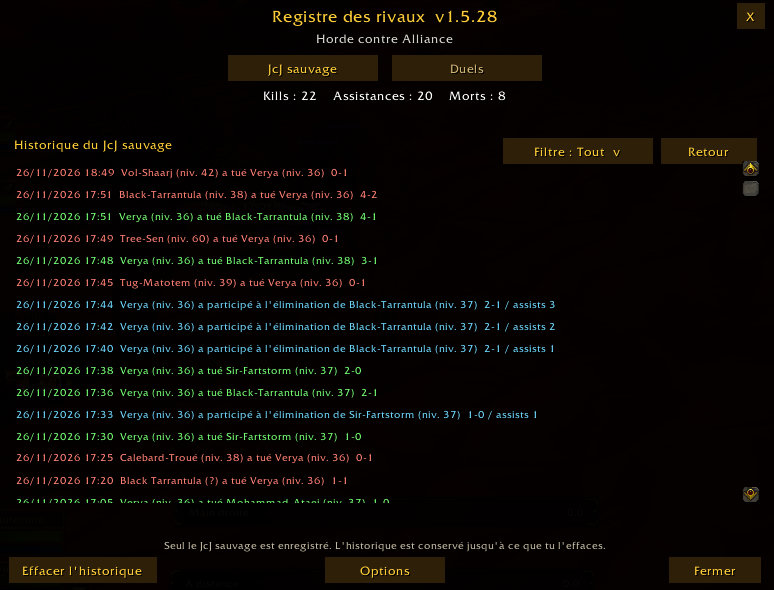
- Adds a chronological entry with date, time, names and known levels, plus running kill/death scores and assist totals. The location is shown directly at the end of each encounter or duel entry. Long entries wrap without overlapping. Hover an entry for damage share and allied contributors when available. Older encounters without a saved location show "Unknown location".
- Shows lifetime kill, assist and death totals and counts for each rival.
- Shows every rival in a scrollable list and keeps each page to the five most recent encounters. The History button beside the recent encounters header opens the full history for the selected section.
- Click a rival to see only your encounter history with that character.
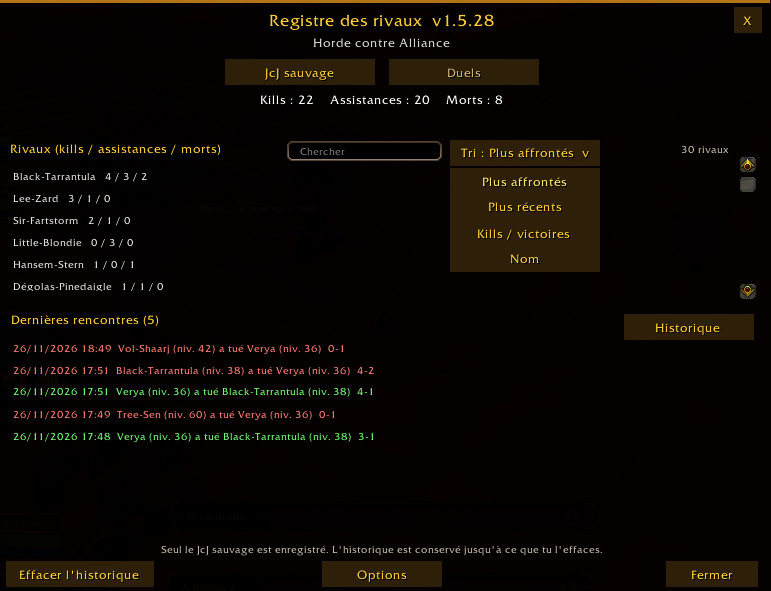
- Search for a name and choose activity, recency, score or name sorting from the menu. A rival's detail view also shows their record, last encounter date and location.
- In full history, use the Filter menu to show all events, kills, assists or deaths in open-world PvP; in Duels, filter wins or losses. Filters also work in one rival's detail history.
- Saves data per character through WoW's SavedVariables and keeps it across reloads and relaunches. The full history remains until you clear it; lifetime scores are stored separately.
- Displays a question mark when the game did not expose an opponent's level. A level is usually known after that player was your target, mouseover or visible nameplate.
- Ignores deaths in battlegrounds and arenas. In a dungeon or raid, it records a death only when the recap identifies an enemy player.
How to use the addon
- Click Help or type /rivals help (also /rivals aide) for the in-game guide, with getting started, scores and history, saved data, and the full command reference. It appears on the first panel opening and stays available through Help after dismissal.
- Type /rivals to show or hide the panel.
- Click the minimap icon to show or hide the panel; drag it around the minimap to move it.
- Type /rivals help to show the command reminder. Use /rivals debugdeath to inspect death tracking, or /rivals recoverdeath to reread the latest recap.
- Open Options to enable damage diagnostics or export/merge a backup. Type /rivals debugdamage to toggle diagnostic messages.
- In Backup / restore, click Export, copy the text to a safe file, then paste it back later and choose Merge backup. The merge keeps existing data and skips duplicate encounters.
- Type /rivals clear, then /rivals clear confirm to erase encounter lines only. Lifetime rival scores stay intact.
- Drag the panel by its background. In full history, use the mouse wheel or vertical scrollbar to browse encounters.
- Use the mouse wheel over the rival list when it is taller than the visible area.
Tracking limits
WoW Forever blocks addons from reading the combat log, and the damage meter does not provide hit order or always identify the finisher. The addon therefore combines final-blow events, honor-credit events and observed player deaths, including when several targets die close together. When a mob finishes a recently engaged enemy, the addon credits the kill without requiring the damage meter to expose that victim's row. If the finisher is unknown, an honor award after a recent engagement confirms a kill unless an enemy player finisher is identified. An unnamed honor credit must match a recently observed death; when multiple deaths happen close together, they are matched in observation order. Some details remain unavailable, especially exact damage order in a group fight.
The addon does not ask you to confirm or classify encounters. Attribution can be incomplete or inferred when the game does not expose the victim or finisher; this is a local record, not a verified competitive ranking.
Questions
Will I download the creator's history? No. Every character starts with an empty history and stores its own encounters locally, separately from other characters on the same account. Personal saved data is not part of the addon download.
Will a reload erase my scores? The addon saves both history and scores through the game's per-character saved variables. Clearing history removes the encounter lines but keeps lifetime rival scores. Options includes backup export and merge.
How do I open it? Type /rivals or click the crossed-weapons minimap icon. Click a rival for only your fights against them; use History for the full list and Return to leave it.
Is there an online leaderboard? No. The addon keeps a local record; it does not automatically upload combat history to a website.
Comments
What works, what breaks, what you would like next: the author reads it all here.
Sign in to leave a comment
No comment yet.